Purpose
To automatically calculate an unknown/unsolved pitch for a bay window layout and ensure that planes in the bay window area intersect at one point.
Note that you can use this functionality before or after you solve/cut planes.
Prerequisites
A layout with a bay window or curved wall
Steps
 Watch videos
Calculate Unknown Pitch for 5-sided bay window
Calculate Unknown Pitch for 3-sided bay window
Calculate Unknown Pitch for architectural elements (radius walls, curved bays, turrets)
To calculate an unknown pitch:
- From the Planes menu, select Unknown Pitch or click
 .
The Calculate Unknown Pitch window displays.
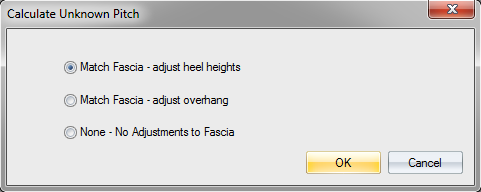
- Select an option:
Match Fascia - adjust heel heights - solve the pitch and adjust heel heights
Match Fascia - adjust overhang - solve the pitch and adjust overhangs
None - No adjustments to Fascia - solve the pitch without making any adjustments to fascia
For this example, Match Fascia - adjust heel heights was selected.
- Click OK
The following prompt displays: 
- Select the first, second, and third fixed planes.
The following prompt displays: 
 See example
Bay window with three fixed planes selected.
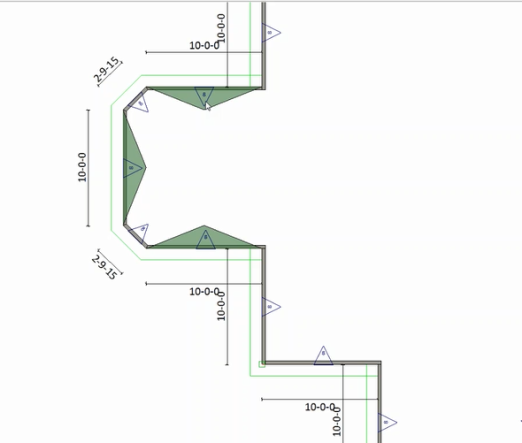
- Select the planes you want to adjust and right-click to accept.
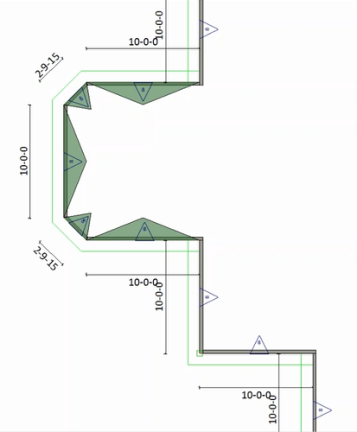
The following prompt displays: 
- Select the plane that controls the heel height for fascia adjustment.
For this example, the angled wall heel height will stay the same and the side wall plane will be raised so that the fascia matches.
- Select either of the angled walls.
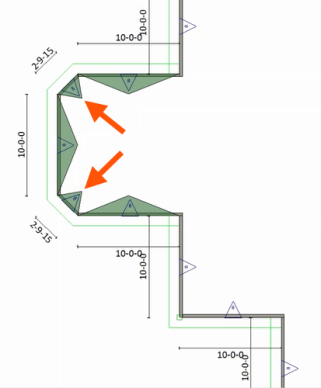
Truss Studio makes the appropriate adjustments. Note that the pitch changed and a nominal 2x4 heel height was retained.
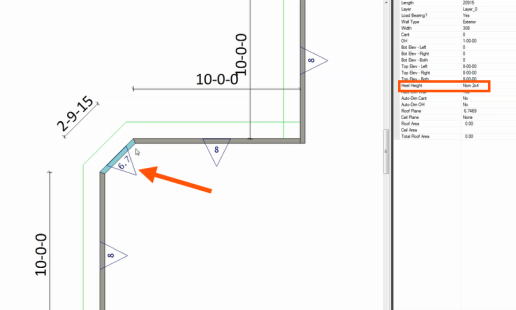
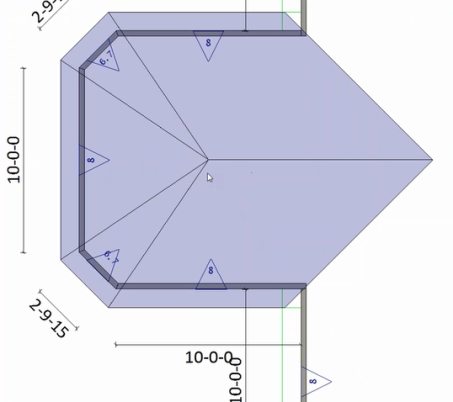
When the planes are cut, the ridge height and fascia match.
The workflow for the other Calculate Pitch options is similar.
Related Topics