
Purpose
Quickly add connectors to a truss or layout
Prerequisites
An existing layout with truss-to-truss or truss-to-beam connections
Steps
- Select Auto Connector Selection from the Truss Operations menu or click
 .
The Connection Type dialog displays.
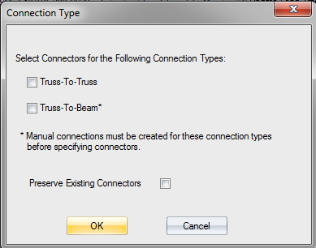
- Select the connection type.
 Note that if you select Truss-to-Beam connection, a manual connection must first be created for this type before you can specify a connector solution.
- To preserve existing connectors, check the Preserve Existing Connectors check box.
- Click OK.
Notes: Connectors are specified for all of the connection types selected on this dialog, and where the load exceeds the amount specified in the EnvData > Layout Settings > Load Transfer > Minimum Load Before Auto Specifying Connectors setting.
The lowest cost installed connector in your inventory is selected for each connection.
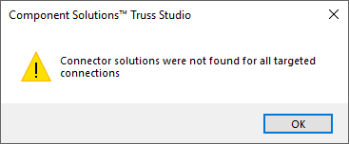
If there is not a viable connector solution in your inventory, the lowest installed cost connector from the comprehensive Simpson Strong-Tie connector catalog. is selected. If a non-inventory item is specified it will be indicated on the layout and also flagged as a special order item in Director (indicated by red text). If there are no passing solutions for a connection, no connector is specified and the following message displays:
Connectors are only specified for loaded connection indicators. They are not specified for non-loaded connection indicators that do not have an associated bearing.
Related Topics