Purpose
Add custom connection to a layout
Steps
- Select Create Connection from the Truss Operations menu.
- Select the first truss for the connection.
- Select the second truss or wall for the connection.
The Connector Location dialog displays.
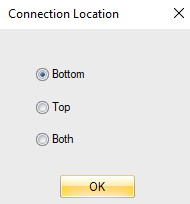
Select the connector location as Top, Bottom, or Both.
A connectivity indicator is displayed at the center line where the first and second truss or wall intersect. Note that they do not have to touch or be on the same layer for connections to be created, and for load transfer to happen.
Related Topics